Category Archives: Advertising

Advertising Design Elements & Principles

Open up your Visual Journals

Think – Pair – Share Time

Define SPACE as an element of design? Why might it be important to understand and use?

d74c84f36790085df455e679e2c6e6c9

Learning target:

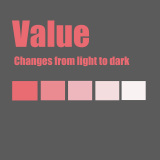
  • I can successfully use the shape and gradient tool to create different kinds of value.

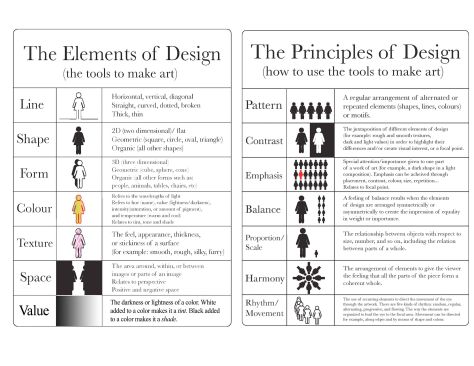
There are seven basic elements of design. These elements include:

  • Linespace
  • Texture
  • Color
  • Shape
  • Form
  • Value
  • Space


There are seven basic principles of design. These principles include:

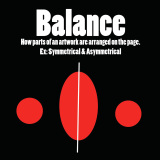
  • Balancebalance
  • Contrast
  • Emphasis
  • Movement
  • Pattern
  • Rhythm
  • Unity

Final requirements for the project:

  • A single 10 x 10″ layer named for each Principle and Elements of Art (14 total).
  • Each layer named with the Principle or Element.
  • A definition in your own words.
  • A graphic depiction of the Principle or Element.
  • Turn in a final image file as a PSD using the naming convention lastname_pe.psd

File management: Your assignment folders and files are organized and set up to classroom expectations.

Deadline: Turn your visual journal link and final Photoshop file to the Google classroom assignment by the end of the school day Tuesday, March 3rd. Name your final file lastname_pedesign.psd

How will you be graded?

Each principle and element layer is worth points. If you turn in all principles and elements layers with all of the requirements you will earn 100%. If, for example, you turn in 7 layers with all requirements you will earn 50%. Turning in 10 principles and elements layers with all requirements will be graded at 71%. Turning in 1 principle and elements layers with all requirements will be graded at 7%.

If you don’t have all of the necessary requirements for each of your layers you will not receive credit for those layers.

All work will need to be turned in by Tuesday, March 3rd by the end of the school day to receive full credit. Late work will be assessed on completeness and marked down by 50%. No work will be accepted after a 1 week grace period. Extra time will be allowed for students with excused absences.

Advertising Design Elements & Principles

Open up your Visual Journals

Think – Pair – Share Time

What are shape and form and what makes them different?

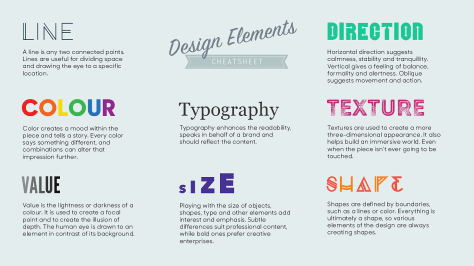
design-elements_cheatsheet--6nvkixkjni_s1800x0_q80_noupscale

Learning target:

  • I can successfully use the shape tool to create different kinds of shapes.
  • I can successfully use the color picker and swatch panel.

There are seven basic elements of design. These elements include:

  • Lineshape
  • Texture
  • Color
  • Shape
  • Form
  • Value
  • Space


There are seven basic principles of design. These principles include:

  • Balancebalance
  • Contrast
  • Emphasis
  • Movement
  • Pattern
  • Rhythm
  • Unity

Final requirements for the project:

  • A single 10 x 10″ layer named for each Principle and Elements of Art (14 total).
  • Each layer named with the Principle or Element.
  • A definition in your own words.
  • A graphic depiction of the Principle or Element.
  • Turn in a final image file as a PSD using the naming convention lastname_pe.psd

File management: Your assignment folders and files are organized and set up to classroom expectations.

Deadline: Turn your visual journal link and final Photoshop file to the Google classroom assignment by the end of the school day Tuesday, March 3rd. Name your final file lastname_pedesign.psd

How will you be graded?

Each principle and element layer is worth points. If you turn in all principles and elements layers with all of the requirements you will earn 100%. If, for example, you turn in 7 layers with all requirements you will earn 50%. Turning in 10 principles and elements layers with all requirements will be graded at 71%. Turning in 1 principle and elements layers with all requirements will be graded at 7%.

If you don’t have all of the necessary requirements for each of your layers you will not receive credit for those layers.

All work will need to be turned in by Tuesday, March 3rd by the end of the school day to receive full credit. Late work will be assessed on completeness and marked down by 50%. No work will be accepted after a 1 week grace period. Extra time will be allowed for students with excused absences.

Advertising Design Elements & Principles

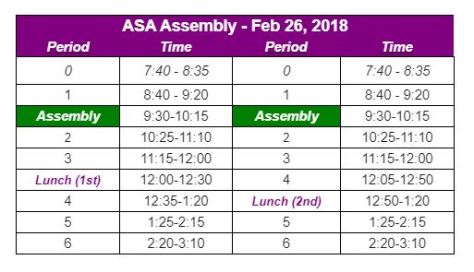
assemblyOpen up your Visual Journals

Think – Pair – Share Time

  • What are the primary colors?
  • What are the secondary colors?
  • What are the tertiary colors?
  • What is the difference between additive and subtractive color?

Learning target:

  • I can successfully use the shape tool to create different kinds of shapes.
  • I can successfully use the color picker and swatch panel.

There are seven basic elements of design. These elements include:

  • Linecolor
  • Texture
  • Color
  • Shape
  • Value
  • Form
  • Space


There are seven basic principles of design. These principles include:

  • Balancebalance
  • Contrast
  • Emphasis
  • Movement
  • Pattern
  • Rhythm
  • Unity

Final requirements for the project:

  • A single 10 x 10″ layer named for each Principle and Elements of Art (14 total).
  • Each layer named with the Principle or Element.
  • A definition in your own words.
  • A graphic depiction of the Principle or Element.
  • Turn in a final image file as a PSD using the naming convention lastname_pe.psd

File management: Your assignment folders and files are organized and set up to classroom expectations.

Deadline: Turn your visual journal link and final Photoshop file to the Google classroom assignment by the end of the school day Tuesday, March 3rd. Name your final file lastname_pedesign.psd

How will you be graded?

Each principle and element layer is worth points. If you turn in all principles and elements layers with all of the requirements you will earn 100%. If, for example, you turn in 7 layers with all requirements you will earn 50%. Turning in 10 principles and elements layers with all requirements will be graded at 71%. Turning in 1 principle and elements layers with all requirements will be graded at 7%.

If you don’t have all of the necessary requirements for each of your layers you will not receive credit for those layers.

All work will need to be turned in by Tuesday, March 3rd by the end of the school day to receive full credit. Late work will be assessed on completeness and marked down by 50%. No work will be accepted after a 1 week grace period. Extra time will be allowed for students with excused absences.

Advertising Design Elements & Principles

Open up your Visual Journals

Think – Pair – Share (3 minutes)

What was the most challenging part of using Photoshop yesterday? How will you overcome those challenges today?

Learning target:

  • I can successfully create a new 10×10 inch document using Adobe Photoshop
  • I can successfully use the brush tool to create different kinds of textures.
  • I can complete at least two principles and elements of design layers using Adobe Photoshop.

What are the principles and elements of design? Why are they important to understand?

Using Adobe Photoshop, create 14 layers, one for each element and principle of design. Name each layer and create a visual interpretation as well as a definition for each element and principle.

There are seven basic elements of art and design. These elements include:

  • Linewayrynen_texture
  • Color
  • Value
  • Shape
  • Form
  • Texture
  • Space

There are seven basic principles of art and design. These principles include:

  • Balancebalance
  • Contrast
  • Emphasis
  • Movement
  • Pattern
  • Rhythm
  • Unity

Final requirements for the project:

  • A single 10 x 10″ layer named for each Principle and Elements of Art (14 total).
  • Each layer named with the Principle or Element.
  • A definition in your own words.
  • A graphic depiction of the Principle or Element.
  • Turn in a final image file as a PSD using the naming convention lastname_pe.psd

File management: Your assignment folders and files are organized and set up to classroom expectations.

Deadline: Turn your visual journal link and final Photoshop file to the Google classroom assignment by the end of the school day Tuesday, March 3rd. Name your final file lastname_pedesign.psd

How will you be graded?

Each principle and element layer is worth points. If you turn in all principles and elements layers with all of the requirements you will earn 100%. If, for example, you turn in 7 layers with all requirements you will earn 50%. Turning in 10 principles and elements layers with all requirements will be graded at 71%. Turning in 1 principle and elements layers with all requirements will be graded at 7%.

If you don’t have all of the necessary requirements for each of your layers you will not receive credit for those layers.

All work will need to be turned in by Tuesday, March 3rd by the end of the school day to receive full credit. Late work will be assessed on completeness and marked down by 50%. No work will be accepted after a 1 week grace period. Extra time will be allowed for students with excused absences.

Advertising Design Elements & Principles

Think – Pair – Share (3 minutes)

What are Principles and Elements of Design? Why do advertisers use them in marketing campaigns?

Learning target:

  • I can successfully create a new 10×10 inch document using Adobe Photoshop
  • I can complete at least two principles and elements of design layers using Adobe Photoshop.

What are the principles and elements of design? Why are they important to understand?

Using Adobe Photoshop, create 14 layers, one for each element and principle of design. Name each layer and create a visual interpretation as well as a definition for each element and principle.

There are seven basic elements of art and design. These elements include:

  • Linevalue
  • Color
  • Value
  • Shape
  • Form
  • Texture
  • Space

There are seven basic principles of art and design. These principles include:

  • Balancebalance
  • Contrast
  • Emphasis
  • Movement
  • Pattern
  • Rhythm
  • Unity

Final requirements for the project:

  • A single 10 x 10″ layer named for each Principle and Elements of Art (14 total).
  • Each layer named with the Principle or Element.
  • A definition in your own words.
  • A graphic depiction of the Principle or Element.
  • Turn in a final image file as a PSD using the naming convention lastname_pe.psd

File management: Your assignment folders and files are organized and set up to classroom expectations.

Deadline: Turn your visual journal link and final Photoshop file to the Google classroom assignment by the end of the school day Tuesday, March 3rd. Name your final file lastname_pedesign.psd

How will you be graded?

Each principle and element layer is worth points. If you turn in all principles and elements layers with all of the requirements you will earn 100%. If, for example, you turn in 7 layers with all requirements you will earn 50%. Turning in 10 principles and elements layers with all requirements will be graded at 71%. Turning in 1 principle and elements layers with all requirements will be graded at 7%.

If you don’t have all of the necessary requirements for each of your layers you will not receive credit for those layers.

All work will need to be turned in by Tuesday, March 3rd by the end of the school day to receive full credit. Late work will be assessed on completeness and marked down by 50%. No work will be accepted after a 1 week grace period. Extra time will be allowed for students with excused absences.

Intro to Adobe Page

Explore Creating a Personalized Portfolio:

Students will create a personalized portfolio template that they can use to curate and reflect on their learning process and/or showcase the work they are proud of throughout the semester. Today’s lesson will be the beginning of a process that will be ongoing. 

  • What is a digital portfolio?
  • Explore some examples of Spark made portfolios.  MS/High School Examples.
  • After looking at the examples provided, explore the following questions with a partner and answer the questions below together:
    • What makes a good portfolio?
    • How might a portfolio be a reflection of my values and/or my best work?

How to Create a Personalize Portfolio:

In this section, you will open Adobe Spark PAGES for the first time and learn how to use the tool. 

How do I create my own Webpage?

Watch THIS  video on how to use Spark PAGE

Apply Your Learning:

Create a Digital Portfolio Using Adobe Spark

1) Make Your Thinking Visible and Share Your Work. 

You will create a template of what will become your digital portfolio for the semester. You can use this to share your process (by taking screenshots or screencasts of your in-progress work) and/or curate “final” pieces of work you want to share. 

Take 10 – 20  minutes to create the template for your digital portfolio.  

Because a portfolio can be very personal, it might change. Please include the following in your portfolio:

1) A Title with your Name and a meaningful picture (can be their own or one from the free photos)

2) An introduction to your learning goals for the semester. 

3) New content from the personal logo assignment. Add a reflection describing what you did and learned. 

2) Getting Started & Publishing Your Spark PAGE

Watch THIS short video tutorial on getting started with Page and how to publish your work with a link.

Share & Reflect:

Publish Your Creation For Feedback

Share your PAGE

Publishing your work and portfolios is crucial. We will use Padlet to publish your work where other students can review and comment. Your portfolios are meant to be a representation of a work in progress therefore, feedback is crucial to improve your creations.   

Reflect 

Take a moment to reflect on your creations after reviewing each other’s work. Use the following questions below and add your reflections on a post-it note and share in smaller groups.   

  1. How do you think your portfolio will help you improve as a learner this year? 
  2. What do you think will be important to share in your portfolio this year?
  3. What steps will you take to ensure you are responsible for your portfolio this year?

Class notes:

Hey, T-Wolves. If you have ever thought about giving back to your community and like working with younger students to help them succeed, apply to be a Heritage mentor at Sifton Elementary. Not only will you be a great role model for future Heritage students, but the time you invest is priceless and looks great on a resume or application for whatever is next for you. Come to room 578 for more details.


Finish Logo Design & Intro to Adobe Page

Think – Pair – Share

Why is it important to share your work with others?

Download a .jpg image of your favorite logo to Google classroom and Padlet

Watch this short video HERE on how to save and share.

Publish Your Creation For Feedback

It is really important for you to be able to share your creations and receive feedback on your work so that you can feel proud and push your own thinking. Something really special happens when you are able to see each other’s work and comment on that work.

Reflect on Each Others Logos

Glance over each other’s creations in a “Gallery” walk. Look at each other’s creations and provide feedback:

  • What Glowed (worked)?
  • Where is some room for growth – provide specific ideas of how it can grow – this should be very practical advice.

Open your Google document from Tuesday, add your favorite personal logo and answer the following questions:

  • Does your logo use the requirements of the assignment?
  • What does the logo you created say about you?
  • What did you include in the logo to make it personal?
  • Is your logo design simple? Describe why.
  • Is your personal logo design authentic to who you are? Describe why.
  • Is your personal logo memorable and timeless? Describe why.

When you are finished creating a post log, download your favorite creation as a JPEG file and add it to the assignment and Padlet (link is found at Google classroom). You will use your logo design to create a brand in another activity.

Explore Creating a Personalized Portfolio:

Students will create a personalized portfolio template that they can use to curate and reflect on their learning process and/or showcase the work they are proud of throughout the semester. Today’s lesson will be the beginning of a process that will be ongoing. 

  • What is a digital portfolio?
  • Explore some examples of Spark made portfolios.  MS/High School Examples.
  • After looking at the examples provided, explore the following questions with a partner and answer the questions below together:
    • What makes a good portfolio?
    • How might a portfolio be a reflection of my values and/or my best work?

How to Create a Personalize Portfolio:

In this section, students will open Adobe Spark PAGES for the first time and learn how to use the tool. 

How do I create my own Webpage?

Watch THIS  video on how to use Spark PAGE

Apply Your Learning:

Create a Digital Portfolio Using Adobe Spark

1) Make Your Thinking Visible and Share Your Work. 

You will create a template of what will become your digital portfolio for the semester. You can use this to share your process (by taking screenshots or screencasts of their in-progress work) and/or curate “final” pieces of work you want to share. 

Take 10 – 20  minutes to create the template for your digital portfolio.  

Because a portfolio can be very personal, it might change. Please include the following in your portfolio:

1) A Title with your Name and a meaningful picture (can be their own or one from the free photos)

2) An introduction to your learning goals for the semester. 

3) Any content you might want to add that is either complete or needs more work. Add a reflection describing what you did and learned. 

2) Getting Started & Publishing Your Spark PAGE

Watch THIS short video tutorial on getting started with Page and how to publish your work with a link.

Share & Reflect:

Publish Your Creation For Feedback

Share your PAGE

Publishing your work and portfolios is crucial. We will use Padlet to publish your work where other students can review and comment. Your portfolios are meant to be a representation of a work in progress therefore, feedback is crucial to improve your creations.   

Reflect 

Take a moment to reflect on your creations after reviewing each other’s work. Use the following questions below and add your reflections on a post-it note and share in smaller groups.   

  1. How do you think your portfolio will help you improve as a learner this year? 
  2. What do you think will be important to share in your portfolio this year?
  3. What steps will you take to ensure you are responsible for your portfolio this year?


Logo Design

As you enter class please log in to Google classroom. 

For those students who have not taken the Pre-Assessment quiz through Precision Exams please sign up at the Google Classroom. For everyone else, continue designing your personal logos. Download a .jpg image of your favorite personal logo and add your logo design to Padlet. There is a link at the Google classroom.

Continue Creating!

Design as many personal logos as possible using the creative constraints provided: 

1) Maximum Three Colours

2) One Icon

3) Your  Name (preferably your full name)

3) Download a .jpg image of your favourite logo to Google classroom and Padlet

Watch this short video HERE on how to save and share.

Publish Your Creation For Feedback

It is really important for you to be able to share your creations and receive feedback on your work so that you can feel proud and push your own thinking. Something really special happens when you are able to see each other’s work and comment on that work.

Reflect on Each Others Logos

Glance over each other’s creations in a “Gallery” walk. Look at each other’s creations and provide feedback:

  • What Glowed (worked)?
  • Where is some room for growth – provide specific ideas of how it can grow – this should be very practical advice.

Open your Google document from yesterday, add your favorite personal logo and answer the following questions:

Does your logo use the requirements of the assignment?

What does the logo you created say about you?

What did you include in the logo to make it personal?

Is your logo design simple? Describe why.

Is your personal logo design authentic to who you are?

Is your personal logo memorable and timeless? Describe why.


Logo Design

Think-Pair-Share: (3 minutes)

What is a logo? Why are logos used?

Explore:

  • What makes a good logo?
  • As a class, we will watch the following VIDEO. (7 minutes)
  • Explore some examples of Spark Made Logos.  4th Grade Examples, High School Examples.
  • After watching the video and looking at the examples provided, explore the following questions with a partner and answer the questions below on a Google document: (10 minutes)
    • What makes a good logo?
      • What makes a logo effective/timeless?
    • What is important to you?
    • What visuals would best represent you in a logo?
    • Why is it important to create multiple versions of a design?
  • Choose one speaker from your group to share your findings with the rest of the class.

Getting logged into Adobe Spark: (5 minutes)

  • How do I create my own logo?
  • Watch THIS tutorial on how to log in.
  • Log in with your school account at spark.adobe.com
  • Watch THIS  video on how to use Spark Post

Create a Logo Using Adobe Spark

1) Whole-group discussion

Why is it important to have many versions of creation when designing something new? 

The best way to learn something new is … practice! The more you create, the more you will figure out what works and what you like and dislike.  

2) Get Creating  

Take 10  minutes to design as many logos as possible using the creative constraints provided: 

1) Maximum Three Colours

2) One Icon

3) Your  Name (preferably your full name)

3) Download your Favourite Logo to Google classroom and Padlet

When you are finished creating a post log, download your favorite creation as a JPEG. You will use your logo design to create a brand in the extension activity.  Watch this short video HERE on how to share.

Publish Your Creation For Feedback

It is really important for you to be able to share your creations and receive feedback on your work so that you can feel proud and push your own thinking. Something really special happens when you are able to see each other’s work and comment on that work.

Reflect on Each Others Logos

Glance over each other’s creations in a “Gallery” walk. Look at each other’s creations and provide feedback:

  • What Glowed (worked)?
  • Where is some room for growth – provide specific ideas of how it can grow – this should be very practical advice.