Tag Archives: Elements & Principles

Creation of a State License plate

Learning Targets:

  • I can research the unique characteristics of a state of my choice.
  • Using my research I can produce a presentation about the state of my choice using Adobe Spark page or video.
  • I can design (using elements and principles of design) to create a unique license plate.

Think, pair, share:

  •  What have you discovered during your research about the state of your choice you find most interesting? Is the most interesting thing about your state visually interesting and work as a graphic element for your license plate design?

Your research needs to include:

  1. What is the capital of the state?
  2. What is the state motto?
  3. When did the state officially become part of the United States?
  4. What is the state bird or mammal?
  5. What is the most popular travel destination?
  6. What is the largest city?
  7. How many people live in the state?
  8. What is one little known fact about the state?
  9. What is the number one industry in the state?
  10. What is the state most known for?
  11. What kind of wildlife lives in the state?
  12. How many parks are in the state.
  13. Who or what is the most famous icon/person recognized by the state?
  14. Who is the state’s poet laureate?
  15. Add the state flag to your research.

Use your research to help guide you in your license plate design. Choose two or three visuals based on your research you believe might make for a good license plate design.
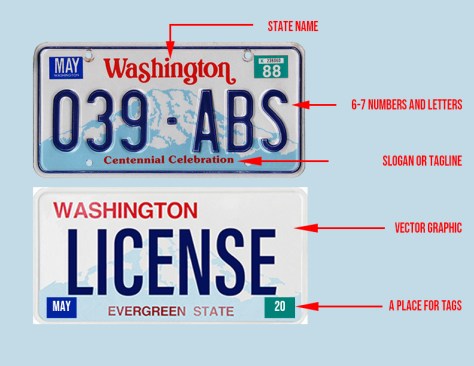
washington-license-plate rubric

  • You may pick any state (Only one state per student, please).
  • Research the state of your choice. Use Adobe Spark page or video to present your research.
  • Your license plate design needs to include a color scheme that reflects the state or illustrative direction of the design.
  • Your license plate design needs to include a vector graphic made from a raster image (pixels) that is unique about the state.
  • Please use the elements and principles of design to help guide your design.
  • Use Adobe Photoshop and the template for your license plate design.

Deadline: Friday, March 13, 2020.
Creation of a State License plate

Think, pair, share:

You have been hired to produce a license plate to advertise and promote a state. How will you begin the project?

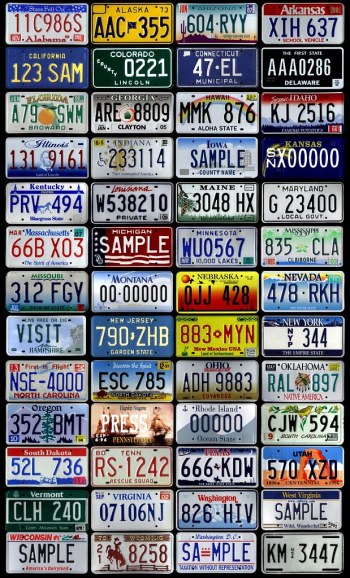
license plates


You may pick any state. Only one state per student, please.

Research the state of your choice. Use Adobe Spark page or video to present your research.

Your license plate design needs to include a color scheme that reflects the state.

Your license plate design needs to include a vector graphic or raster image (pixels) that is unique about the state.

Please use the elements and principles of design to help guide your design.

Use Adobe Photoshop for your license plate design.

Deadline: Friday, March 13, 2020.

Learning Targets:

  • I can research the unique characteristics of a state of my choice.
  • Using my research I can produce a presentation using Adobe Spark page or video.
  • I can design (using elements of art and design) a unique license plate.

Advertising Design Elements & Principles

Open up your Visual Journals (Spark Pages)

Think – Pair – Share

Select and save one of the ads below to your Spark page and identify the top 2 principles and elements of design you recognize in the ad.

Where does your eye go first? Is there a directional flow to the ad? Describe how your eye travels through the ad.

Does the ad grab your attention? Describe how.

Describe the typography. Does the ad use a serif or sans serif type? What about the weight of the type. What typestyle does the ad use (normal, bold, italic, bold italic)? Does the typography reflect the message of the advertisement? Describe why.

Does the ad use white space or negative space? Describe how.

Who do you think is the target audience for the ad and why?


Mr. Wayrynen teaches you how to turn in your P&E assignment! We will have a quiz tomorrow.

Final requirements for the project:

  • A single 10 x 10″ layer named for each Principle and Elements of Art (14 total).
  • Each layer named with the Principle or Element.
  • A definition in your own words.
  • A graphic depiction of the Principle or Element.
  • Turn in a final image file as a PSD using the naming convention lastname_elements.psd
  • Add each element to your Spark page.

File management: Your assignment folders and files are organized and set up to classroom expectations.

Deadline: Turn your visual journal link and final Photoshop file to the Google classroom assignment by the end of the school day Thursday, March 5th. Name your final file lastname_pedesign.psd and add your designs to your visual journal (Spark page).

How will you be graded?

Each principle and element layer is worth points. If you turn in all principles and elements layers with all of the requirements you will earn 100%. If, for example, you turn in 7 layers with all requirements you will earn 50%. Turning in 10 principles and elements layers with all requirements will be graded at 71%. Turning in 1 principle and elements layers with all requirements will be graded at 7%.

If you don’t have all of the necessary requirements for each of your layers you will not receive credit for those layers.

All work will need to be turned in by Thursday, March 5th by the end of the school day to receive full credit. Late work will be assessed on completeness and marked down by 50%. No work will be accepted after a 1 week grace period. Extra time will be allowed for students with excused absences.

Advertising Design Elements & Principles

Open up your Visual Journals (Spark Pages)

Think – Pair – Share Time

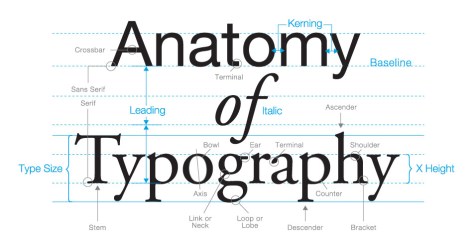
What font did you choose for your Spark page? Is the font selection Sans Serif or Serif?

website-design-fonts


Learning target:

  • I can successfully use Photoshop tools and layers to illustrate the seven principles of design.

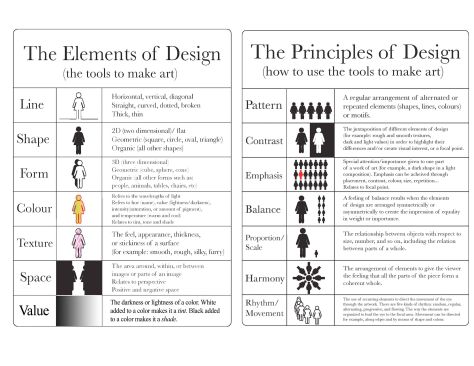
There are seven basic principles of design. These principles include:

  • Balancebalance
  • Contrast
  • Emphasis
  • Movement
  • Pattern
  • Rhythm
  • Unity
  • Repetition
  • Space

There are seven basic elements of design. These elements include:

  • Linespace
  • Texture
  • Color
  • Shape
  • Form
  • Value
  • Space


Final requirements for the project:

  • A single 10 x 10″ layer named for each Principle and Elements of Art (14 total).
  • Each layer named with the Principle or Element.
  • A definition in your own words.
  • A graphic depiction of the Principle or Element.
  • Turn in a final image file as a PSD using the naming convention lastname_elements.psd
  • Add each element to your Spark page.

How to add an image to your Spark page.

File management: Your assignment folders and files are organized and set up to classroom expectations.

Deadline: Turn your visual journal link and final Photoshop file to the Google classroom assignment by the end of the school day Thursday, March 5th. Name your final file lastname_pedesign.psd and add your designs to your visual journal (Spark page).

How will you be graded?

Each principle and element layer is worth points. If you turn in all principles and elements layers with all of the requirements you will earn 100%. If, for example, you turn in 7 layers with all requirements you will earn 50%. Turning in 10 principles and elements layers with all requirements will be graded at 71%. Turning in 1 principle and elements layers with all requirements will be graded at 7%.

If you don’t have all of the necessary requirements for each of your layers you will not receive credit for those layers.

All work will need to be turned in by Thursday, March 5th by the end of the school day to receive full credit. Late work will be assessed on completeness and marked down by 50%. No work will be accepted after a 1 week grace period. Extra time will be allowed for students with excused absences.

Advertising Design Elements & Principles

Open up your Visual Journals

Think – Pair – Share Time

Evaluate and describe the movement for this Band-Aid advertisement. Are related items balanced and positioned for an effective advertisement? Describe how? What is the visual emphasis of the ad? Describe.

creative-advertisement (1)


d74c84f36790085df455e679e2c6e6c9

Learning target:

  • I can successfully use Photoshop tools and layers to illustrate the seven principles of design.

There are seven basic principles of design. These principles include:

  • Balancebalance
  • Contrast
  • Emphasis
  • Movement
  • Pattern
  • Rhythm
  • Unity
  • Repetition
  • Space

There are seven basic elements of design. These elements include:

  • Linespace
  • Texture
  • Color
  • Shape
  • Form
  • Value
  • Space


Final requirements for the project:

  • A single 10 x 10″ layer named for each Principle and Elements of Art (14 total).
  • Each layer named with the Principle or Element.
  • A definition in your own words.
  • A graphic depiction of the Principle or Element.
  • Turn in a final image file as a PSD using the naming convention lastname_elements.psd
  • Add each element to your Spark page.

How to add an image to your Spark page.

File management: Your assignment folders and files are organized and set up to classroom expectations.

Deadline: Turn your visual journal link and final Photoshop file to the Google classroom assignment by the end of the school day Thursday, March 5th. Name your final file lastname_pedesign.psd and add your designs to your visual journal (Spark page).

How will you be graded?

Each principle and element layer is worth points. If you turn in all principles and elements layers with all of the requirements you will earn 100%. If, for example, you turn in 7 layers with all requirements you will earn 50%. Turning in 10 principles and elements layers with all requirements will be graded at 71%. Turning in 1 principle and elements layers with all requirements will be graded at 7%.

If you don’t have all of the necessary requirements for each of your layers you will not receive credit for those layers.

All work will need to be turned in by Thursday, March 5th by the end of the school day to receive full credit. Late work will be assessed on completeness and marked down by 50%. No work will be accepted after a 1 week grace period. Extra time will be allowed for students with excused absences.

Advertising Design Elements & Principles

Open up your Visual Journals

Think – Pair – Share Time

  • Give two examples of how contrast was achieved in this ad. Explain.
  • Describe the intended audience.

body-target-ad

d74c84f36790085df455e679e2c6e6c9

Learning target:

  • I can successfully use the type, shape, and move tools in Photoshop to illustrate seven principles of design.

There are seven basic principles of design. These principles include:

  • Balancebalance
  • Contrast
  • Emphasis
  • Movement
  • Pattern
  • Rhythm
  • Unity
  • Repetition
  • Space

There are seven basic elements of design. These elements include:

  • Linespace
  • Texture
  • Color
  • Shape
  • Form
  • Value
  • Space


Final requirements for the project:

  • A single 10 x 10″ layer named for each Principle and Elements of Art (14 total).
  • Each layer named with the Principle or Element.
  • A definition in your own words.
  • A graphic depiction of the Principle or Element.
  • Turn in a final image file as a PSD using the naming convention lastname_elements.psd
  • Add each element to your Spark page.

How to add an image to your Spark page.

File management: Your assignment folders and files are organized and set up to classroom expectations.

Deadline: Turn your visual journal link and final Photoshop file to the Google classroom assignment by the end of the school day Wednesday, March 4th. Name your final file lastname_pedesign.psd and add your designs to your visual journal (Spark page).

How will you be graded?

Each principle and element layer is worth points. If you turn in all principles and elements layers with all of the requirements you will earn 100%. If, for example, you turn in 7 layers with all requirements you will earn 50%. Turning in 10 principles and elements layers with all requirements will be graded at 71%. Turning in 1 principle and elements layers with all requirements will be graded at 7%.

If you don’t have all of the necessary requirements for each of your layers you will not receive credit for those layers.

All work will need to be turned in by Tuesday, March 4th by the end of the school day to receive full credit. Late work will be assessed on completeness and marked down by 50%. No work will be accepted after a 1 week grace period. Extra time will be allowed for students with excused absences.

Advertising Design Elements & Principles

Open up your Visual Journals

Think – Pair – Share Time

Define SPACE as an element of design? Why might it be important to understand and use?

d74c84f36790085df455e679e2c6e6c9

Learning target:

  • I can successfully use the shape and gradient tool to create different kinds of value.

There are seven basic elements of design. These elements include:

  • Linespace
  • Texture
  • Color
  • Shape
  • Form
  • Value
  • Space


There are seven basic principles of design. These principles include:

  • Balancebalance
  • Contrast
  • Emphasis
  • Movement
  • Pattern
  • Rhythm
  • Unity

Final requirements for the project:

  • A single 10 x 10″ layer named for each Principle and Elements of Art (14 total).
  • Each layer named with the Principle or Element.
  • A definition in your own words.
  • A graphic depiction of the Principle or Element.
  • Turn in a final image file as a PSD using the naming convention lastname_pe.psd

File management: Your assignment folders and files are organized and set up to classroom expectations.

Deadline: Turn your visual journal link and final Photoshop file to the Google classroom assignment by the end of the school day Tuesday, March 3rd. Name your final file lastname_pedesign.psd

How will you be graded?

Each principle and element layer is worth points. If you turn in all principles and elements layers with all of the requirements you will earn 100%. If, for example, you turn in 7 layers with all requirements you will earn 50%. Turning in 10 principles and elements layers with all requirements will be graded at 71%. Turning in 1 principle and elements layers with all requirements will be graded at 7%.

If you don’t have all of the necessary requirements for each of your layers you will not receive credit for those layers.

All work will need to be turned in by Tuesday, March 3rd by the end of the school day to receive full credit. Late work will be assessed on completeness and marked down by 50%. No work will be accepted after a 1 week grace period. Extra time will be allowed for students with excused absences.

Advertising Design Elements & Principles

Open up your Visual Journals

Think – Pair – Share Time

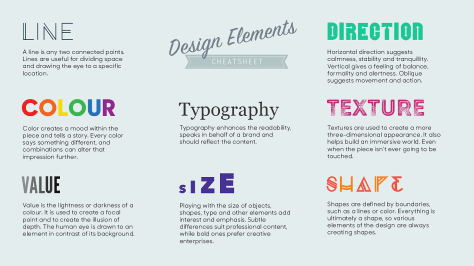
What are shape and form and what makes them different?

design-elements_cheatsheet--6nvkixkjni_s1800x0_q80_noupscale

Learning target:

  • I can successfully use the shape tool to create different kinds of shapes.
  • I can successfully use the color picker and swatch panel.

There are seven basic elements of design. These elements include:

  • Lineshape
  • Texture
  • Color
  • Shape
  • Form
  • Value
  • Space


There are seven basic principles of design. These principles include:

  • Balancebalance
  • Contrast
  • Emphasis
  • Movement
  • Pattern
  • Rhythm
  • Unity

Final requirements for the project:

  • A single 10 x 10″ layer named for each Principle and Elements of Art (14 total).
  • Each layer named with the Principle or Element.
  • A definition in your own words.
  • A graphic depiction of the Principle or Element.
  • Turn in a final image file as a PSD using the naming convention lastname_pe.psd

File management: Your assignment folders and files are organized and set up to classroom expectations.

Deadline: Turn your visual journal link and final Photoshop file to the Google classroom assignment by the end of the school day Tuesday, March 3rd. Name your final file lastname_pedesign.psd

How will you be graded?

Each principle and element layer is worth points. If you turn in all principles and elements layers with all of the requirements you will earn 100%. If, for example, you turn in 7 layers with all requirements you will earn 50%. Turning in 10 principles and elements layers with all requirements will be graded at 71%. Turning in 1 principle and elements layers with all requirements will be graded at 7%.

If you don’t have all of the necessary requirements for each of your layers you will not receive credit for those layers.

All work will need to be turned in by Tuesday, March 3rd by the end of the school day to receive full credit. Late work will be assessed on completeness and marked down by 50%. No work will be accepted after a 1 week grace period. Extra time will be allowed for students with excused absences.

Advertising Design Elements & Principles

assemblyOpen up your Visual Journals

Think – Pair – Share Time

  • What are the primary colors?
  • What are the secondary colors?
  • What are the tertiary colors?
  • What is the difference between additive and subtractive color?

Learning target:

  • I can successfully use the shape tool to create different kinds of shapes.
  • I can successfully use the color picker and swatch panel.

There are seven basic elements of design. These elements include:

  • Linecolor
  • Texture
  • Color
  • Shape
  • Value
  • Form
  • Space


There are seven basic principles of design. These principles include:

  • Balancebalance
  • Contrast
  • Emphasis
  • Movement
  • Pattern
  • Rhythm
  • Unity

Final requirements for the project:

  • A single 10 x 10″ layer named for each Principle and Elements of Art (14 total).
  • Each layer named with the Principle or Element.
  • A definition in your own words.
  • A graphic depiction of the Principle or Element.
  • Turn in a final image file as a PSD using the naming convention lastname_pe.psd

File management: Your assignment folders and files are organized and set up to classroom expectations.

Deadline: Turn your visual journal link and final Photoshop file to the Google classroom assignment by the end of the school day Tuesday, March 3rd. Name your final file lastname_pedesign.psd

How will you be graded?

Each principle and element layer is worth points. If you turn in all principles and elements layers with all of the requirements you will earn 100%. If, for example, you turn in 7 layers with all requirements you will earn 50%. Turning in 10 principles and elements layers with all requirements will be graded at 71%. Turning in 1 principle and elements layers with all requirements will be graded at 7%.

If you don’t have all of the necessary requirements for each of your layers you will not receive credit for those layers.

All work will need to be turned in by Tuesday, March 3rd by the end of the school day to receive full credit. Late work will be assessed on completeness and marked down by 50%. No work will be accepted after a 1 week grace period. Extra time will be allowed for students with excused absences.